Microthemer 1.4.1 Powerful Visual Design CSS Plugin for Customizing WordPress Themes & Plugins

Microthemer Premium WordPress Plugin

$45

Microthemer is a premium WordPress CSS plugin. Microthemer gives WordPress administrators design control over their website or blog without requiring them to learn HTML or CSS code. The videos below illustrate how Microthemer works.

Main Features

  • Customise the design of your theme via a WordPress admin screen (the Microthemer UI), negating the need to learn CSS or HMTL code.
  • Install Micro Themes created by professional designers and then customise them via the Microthemer UI
  • An intuitive visual editing mode that loads editing options over the top of your website (so you can always see what you’re editing)
  • Export a Micro Theme you’ve created as a zip file for sale on the Themeover marketplace in one click. Or, email it to friends who can load it for free with Microloader.
  • A growing repository of free, GPL licensed “Blank Slate” Micro Themes are available to help non-web designers customise themes from scratch and theme authors create saleable Micro Themes in no time at all
  • A growing repository of free, GPL licensed designs (Plugin Styles) for plugin content (e.g. skins for the popular Contact Form 7 plugin)
  • A growing repository of free, GPL licensed “Graphics Packs” for including background images in your designs (e.g. opaque coloured backgrounds)
  • A non-watered down choice of theme styling options (60+ CSS properties). The ultimate visual WordPress CSS plugin.
  • Cross-browser support for rounded corners, box-shadow and linear gradients (with the help of CSS3 PIE)
  • Colour-picker for defining colour values (so you don’t need to remember hex codes)
  • Upload and resize background images which can be incorporated into your design
  • Create a library of Micro Themes which can be imported at will – great for trying out different versions of designs
  • A learning aid for aspiring front-end designers who prefer immediate gratification and a soft learning curve.
  • Nonce security to ensure this plugin doesn’t create any security holes in your WordPress installation
  • Surprisingly light-weight. For such a powerful plugin, Microthemer is very soft-footed. Unlike many other plugins, 95% of the code doesn’t load on non-Microthemer plugin pages – so it won’t slow down your site or admin area.
  • Auto-update feature – update Microthemer from your WordPress dashboard like any regular WordPress plugin
  • Flexible interface that lets you merge your library of archived designs (e.g. Menu Styling) how ever you want
  • Revision History – if you make a mistake you can easily roll back to a previous save (the past 20 saves are remembered)

Screenshots

The Microthemer User Interface (default view)
The Microthemer User interface (UI) provides color pickers and menus for applying CSS styles to your theme without having to understand the CSS code it generates for you. For every element of a web page you want to style, Microthemer gives you over 60 styling options, including: font family, line height, text shadow, text color, background images, background image position, width, height, padding, border, margin, position, background gradients, rounded corners and box shadow.
Microthemer UI (default view)

The Microthemer User Interface (visual view – part 1)
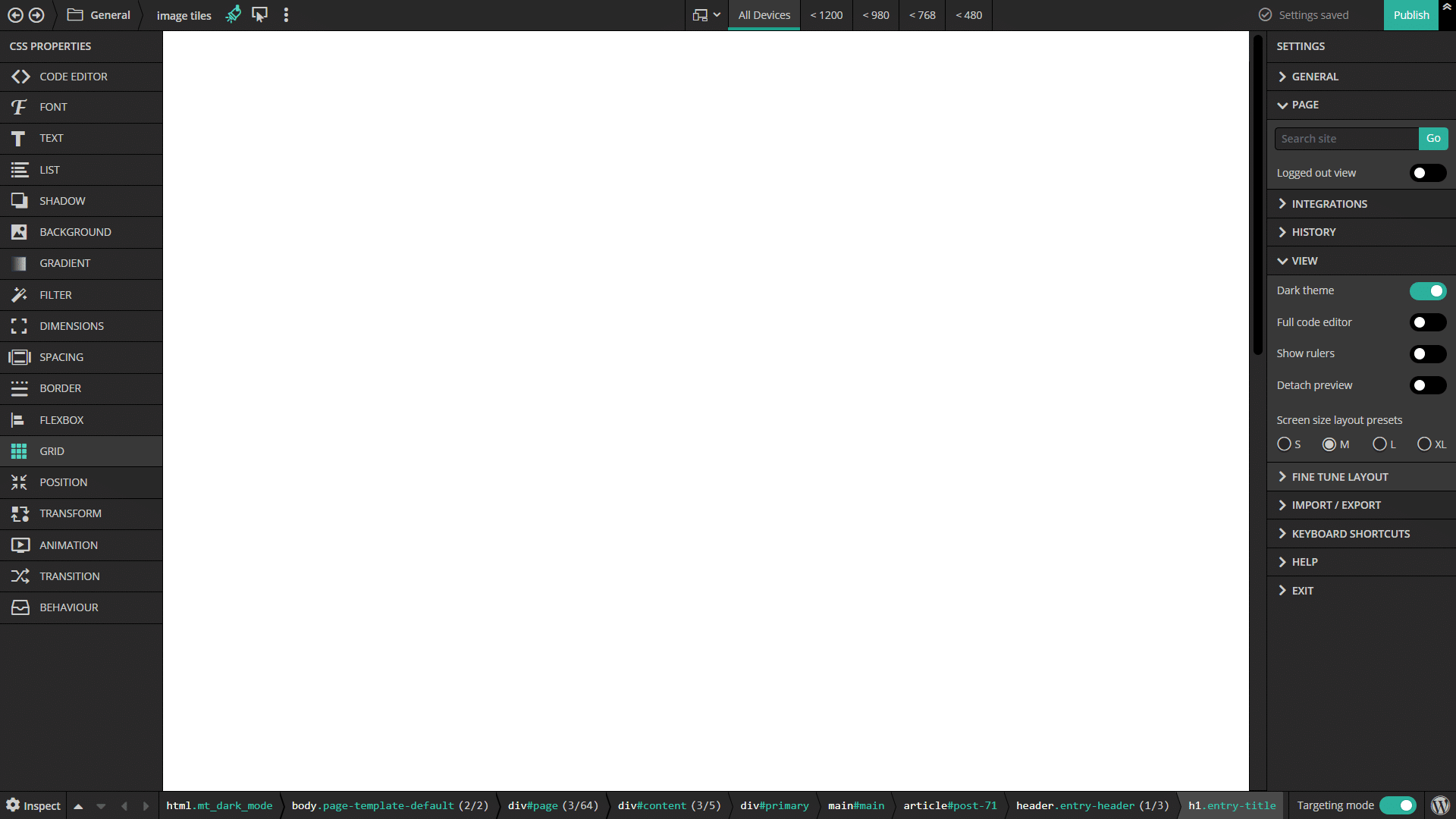
The Microthemer UI has a visual editing view consisting of a large preview window where you can see your website/blog and some editing controls at the bottom.
The Microthemer User Interface (visual view - part 1)

The Microthemer User Interface (visual view – part 2)
Microthemer’s visual view style editing options can be temporarily loaded over the top of the website preview window with the preview still being slightly visible in the background. This visual editing view is what makes Microthemer the number 1 WordPress CSS plugin.
The Microthemer User Interface (visual view - part 2)

CSS3 Options, Integration with CSS3 PIE
Microthemer comes with CSS3 styling options and is pre-integrated with CSS3PIE for Internet Explorer. This means that you can easily apply gradients, rounded corners, and box-shadow to your web page elements in a cross-browser compliant way.
CSS3 Options, Integration with CSS3 PIE

Create Different Design Versions – Re-import Any Time or Share!
Microthemer gives you the option to export your design to a design library of “Micro Themes”. This is great news is you want to try out a number of different design versions without having to delete your previous work. Furthermore, this ability to export your designs means that you can share your designs with others (who can load your design for free with Microloader) or sell your designs on Themeover’s Micro Theme Marketplace.
Create Different Design Versions - Re-import Any Time

Micro Theme Management Options
Microthemer provides you with options creating, installing, zip-exporting, activating, deactivating, and deleting your Micro Themes. You can also upload and resize images that you would like to incorporate in your designs. For Micro Theme authors, Microthemer even provides in-program options for adding meta information and providing end users with helpful instructions.
Micro Theme Management Options

Zip Your Design into a Saleable Digital Product in 1 Click
Sharing the designs you create with Microthemer is as easy as clicking the “Export As Zipped Theme” button. Microthemer will automatically compress your work into a zip file that you can email to friends or submit to Themeover’s marketplace.
Zip Your Design into a Saleable Digital Product in 1 Click

Upgrades, Support & Licensing

  • Free upgrades
  • Free support via our customer support forum
  • Multi-domain license (as long as you own the domain)

Compatibility

Microthemer is compatible with PHP4 and 5, WordPress 2.8 to 3.x, and has been tested in modern browsers.

Firefox, Chrome, Safari, Internet Explorer 7 to 9

Supported WordPress Themes

  • U-Design
  • Woo Canvas
  • Genesis Framework
  • ClassiPress (following a request)
  • Wootique
  • WordPress Themes created with Artisteer (following a request)
  • Twenty Eleven
  • Twenty Ten
  • Thematic
  • Toolboox

Supported WordPress Plugins

  • Contact Form 7
  • WooCommerce (following a request)

Microthemer supports the customization of WordPress themes and plugins in the form of theme/plugin specific importable settings packs which we refer to as “Blank Slate Micro Themes”. We’re adding to our repository of blank slate micro themes all the time.

A Note About Theme/Plugin Compatibility

If you know CSS, you can use Microthemer to customize ANY theme and ANY plugin. If you don’t know CSS, you would struggle without the help of a “Blank Slate Micro Theme” tailor-made to your particular theme or plugin.

We’re Taking Customer Requests

We’re currently taking requests for supporting themes/plugins with Blank Slate Micro Themes. So please post requests in our forum (registration required) or send us a message directly.

Tags

WordPress CSS Plugin, WordPress Add CSS, WordPress Plugin CSS, Microthemer, Microthemer Plugin, WordPress Microthemer Plugin, WordPress, Plugin, Plugins, WordPress Plugin, WordPress Plugins, Code Generator, HTML, CSS, CSS Code Generator, Micro Theme, Micro Themes, Design Tool, Design Software, Design Program

Microthemer Reviews On CodeCanyon

“I’ve been having a play with this tonight, and it is one of those rare gems that you come across, a definite 5 stars from me.” Indie-Film

“If I could give this more than 5 stars I would, I have just installed and works incredible. Looking forward to all your updates. Stick to this one magnificent plugin and I am certain the sales will make it to the top”. Ciaran

“Congratulations for this incredible plugin !!!”. Ayoubiz

“Even though I’m fairly comfortable with html & CSS , I can see this saving me a fair bit of time when customizing colors and styles on new sites. Just make sure to view the Walk-through Video – I watched it twice before grasping the potential of this plugin. A fantastic idea and implementation worth checking out especially if you manage multiple WordPress websites.”. Ivan

“Pure genius. Been looking for something like this for YEARS . Brilliant!” Chris Parks

“this realy rocks men, we love it”. levtcreative

Themeover Customer Feedback

“I must tell you, I’m crazy over this plugin. I have been working with wordpress for the past 7 years, and this is the most useful plugin ever created! I started using it in ALL my projects.” Sam Schnitzler

“Microthemer is working great! Your support is impressive to say the least. Thank you so much! [...] Not only am I impressed with the way Microthemer allows me to use CSS3 styles in all the browsers tested including IE, IE7, FireFox, Chrome and Maxthron 3, but I also love the way all the CSS is so neatly organized. I have been looking for this program for a long time. I am so happy I found Microthemer.” Chuck

“Microthemer is a very good plugin and I think it has a great potential” Yiannis

“I am learning a lot by playing around with Microthemer [...] I could not have got there without Microthemer and your help, so very grateful [...] Do let me know how I can legitimately help promote Microthemer it really is the best thing since sliced bread.” Ed

“I’ll say it once again – this is nice software.” Abland

“First off great plugin [...] Mircothemer is the only plugin of its kind” Micheal

“Thx a lot, great support” Bart

Changelog

1.4.1 (Dec 5, 2012)

# Bugs Fixed
* The angle of CSS3 linear gradients was not consistent across browsers.

1.4 (Sept 6, 2012)

# Enhancement
* Revision History – Settings can now be restored from the previous 20 user actions that changed the Microthemer UI settings (e.g. saving, importing, resetting, activating a micro theme). Useful for undoing any mistakes or recovering from a glitch in the UI.

# Bugs Fixed
* Resetting the Microthemer UI and clearing styles didn’t automatically update the active-styles.css stylesheet to reflect the new state of affairs (an additional save was required to do this).

1.3.8 (Aug 5, 2012)

# Enhancement
* Microthemer now has a better method of ensuring that it’s stylesheet loads after other stylesheets (so that it can override styles without resorting to !important).
* If Microthemer encounters a problem when trying to save your settings, it will prompt you to email an error report to Themeover. We can use these reports to diagnose problems and release fixes quickly.

# Bugs Fixed
* CSS Property description popup was missing for the custom background image position values.
* Selector Editing options in visual view didn’t appear when switching selector under some conditions.
* When using the “Next” and “Previous” buttons in the visual view, dynamically added sections were missed out.
* Fixed some issues with the “Enable sortable sections/selectors” buttons. They didn’t always appear or disappear when they were meant to.
* Dynamically created sections didn’t have the selective export checkbox

1.3.2 (July 21, 2012)

# Enhancement
* Microthemer can now be used on Multisite WordPress installs thanks to Abland’s work: http://themeover.com/forum/topic/settings-options-in-admin/
* After closing the visual view, scrolling to the last edited or triggering selector is now 4 x faster.
* Updated colorbox (for loading visual view) to version 1.3.19 with faster set up procedure

# Bugs Fixed
* When merging settings in the Microthemer UI, the active theme is set to “Custom Configuration” to more accurately describe the action taken by the user (it used to be set to the theme being imported, which didn’t make much sense).
* Renaming a Section was not working. This resulted in downstream errors that negatively affected the Microthemer UI.
* Javascript errors in the Microthemer UI may result in selectors being malformed. In turn, this can create problems saving your settings. Whenever we identify JS errors we fix them. However, we wanted to implement a contingency plan. So now Microthemer looks for malformed selectors and alerts you to exactly which selector you need to delete in order to restore normal functionality.
* Fixed a JS error that occurred after modifying a selector in the visual view under some circumstances
* After closing the visual view, the window didn’t scroll to the triggering selector if nothing was edited.

1.3 (June 7, 2012)

# Enhancement
* Made the textarea for entering CSS selector code full width as I found it often needed manually resizing
* Added option to manually add !important declaration on a per style basis.
* When exporting to a new Micro Theme, the new theme is also available in the import select menu. Useful for when you want to selectively export sections and then easily copy them back into the UI using import with merge (no naming conflicts occur when you do this).
* Updated CSS3 PIE to version 1.0 – first non-beta release.
* You can now specify custom x-axis and y-axis units for background image position
* Added an option to clear CSS style definitions in the Microthemer UI while keeping the sections and selectors intact. It’s a useful way to easily update a Blank Slate Micro Theme after discovering the need for additional selectors during the design process.
* (minor) Moved dependent css styles condition into seperate function for more flexible use

# Bugs Fixed
* Renaming a selector that has the same name as it’s parent section caused javascript errors in the Microthemer UI which presented as buttons not working etc.
* Under some circumstances, installing a Micro Theme resulted in the Theme being renamed as “None”.
* When a Theme enqueues it’s stylesheets there is a possibility that it’s stylesheets will be called after Microthemer’s stylesheet. Microthemer now checks the name of the theme so that it can specify which stylesheets should load BEFORE the Microthemer stylesheet. This was found to be necessary after adding support for ClassiPress.
* Selective export checkbox disappeared after renaming a section
* When Microthemer checks for incorrect image paths, it presented the same image multiple times if it was used multiple times in the design.

1.1.9 (Apr 24, 2012)

# Bugs Fixed
* When trying to activate Microthemer, on some servers this caused the following error message: Warning: file_get_contents() [function.file-get-contents]: URL file-access is disabled in the server configuration

1.1.8 (Apr 19, 2012)

# Enhancement
* Files in Manage Themes table are organised alphabetically now.

# Bugs Fixed
* JS color conflict occurred when used with Templateer aided Artisteer Themes. New naming convention used to fix issue and prevent further issues.

1.1.7 (March 27, 2012)

# Enhancement
* Background image lists are now organised alphabetically
* Microthemer reminds you to activate the automatic update checker so that you can always have the most feature-rich and bug-free version of Microthemer

# Bugs Fixed
* Enabling !important on the Preferences page caused CSS3 PIE gradients to stop working in Internet Explorer

1.1.4 (March 21, 2012)

# Enhancement
* HTML can now be added to the Readme.txt instructions textarea
* Micro Themes can be merged together by an additional import method in the Microthemer UI
* Microthemer UI Sections can be selectively exported to a Micro Theme – useful when combined with the merge method

# Bugs Fixed
* No code was changed, but a procedural problem to do with the plugin directory name changing with updates was found. This caused problems with CSS3 styles in Internet Explorer. The fix is provided in this forum topic.

1.1.2 (March 12, 2012)

# Enhancement
* Auto-update feature added (needs activating on Preferences page)
* Added ‘visibility’ and ‘cursor’ CSS properties to the behaviour group in the microthemer UI

# Bugs Fixed
* The text-transform “capitalize” property was mis-spelt with an “s” so didn’t work
* A call to an undefined jQuery object in jquery.overlay.js caused javascript problems
* On Windows Servers, erroneous https URLs caused server to hang
* Microthemer erroneously offerred to copy background images that were set to ‘none’ to a newly exported Micro Theme
* WordPress admin bar only hidden on Microthemer pages when visual view loads in Microthemer UI
* Creating a new theme from the Manage Themes page wasn’t generating the necessary config.json file
* Auto-adding classes to first and last menu item can now be disabled via the preference page if it causes problems

1.0.7 (March 2, 2012)

# Enhancement
* Added support for WordPress Themes Created using Artisteer
* Option to globally add !important to CSS styles (needed to override some Artisteer CSS styles)

# Bugs Fixed
* position styles didn’t register if applied without other style properties
* under some circumstances, javascript ‘undefined’ error killed script when modifying a CSS selector
* Added JS try-catch so rougue clicks don’t trigger ‘undefined’ errors
* Prevented screenshot on Manage Themes page from being cached to avoid possible confusion

1.0 (February 24, 2012)

The initial release.

Pretty Awesome Right? Get Microthemer Now!

Standard License: $45

Developer License: $90

  • Shopping Cart

    Your Cart is Empty
  • Newsletter Sign Up

  • Customer Testimonials

    "Pure genius. Been looking for something like this for YEARS. Brilliant!"Chris Parks

    "I’ve been having a play with this tonight, and it is one of those rare gems that you come across, a definite 5 stars from me." Indie-Film

    "Your support is impressive to say the least. Thank you so much! [...] Not only am I impressed with the way Microthemer allows me to use CSS3 styles in all the browsers tested including IE, IE7, FireFox, Chrome and Maxthron 3, but I also love the way all the CSS is so neatly organized. I have been looking for this program for a long time. I am so happy I found Microthemer."Chuck

wp-admin

Password Reset

Please enter your e-mail address. You will receive a new password via e-mail.